Day 66 Dec
So today I began work on the clouds for the game. I watched a video on it wasn't really that complicated but i did run into some problems that weren't really helping me. I started by adjusting a regular tool and adjust the width and the size of the wave lengths so it would wiggle around. The video said that it had a cloud function template to overlay over the brush to make it look right but it didn't sadly. So i had to figure out how to adjust it to make it less opaque and more like clouds. The problem was i didn't have template so it wasn't really working. Tomorrow im going to work on this some more and try to get some decent clouds.

Day 65 Dec
Today I was again trying to access the files that Justin had for his game maker. Howie told me to sign out of dropbox and sign back in. So i did that and it downloaded 13 000 files and didnt work. For some reason it doesnt update to the most recent files so im going to have to ask justin to give them. Ive learned that dropbox is just really doesnt work. Even though i am linked to the file for the group. Tomorrow im going work on clouds that justin told me to do for the backgrounds. Im going to check out tys and try to make them because his look amazing.
Day 64 Dec
So today I asked them what to do they were unsure so what im hearing is that they are stuck on what to do next. So in the mean while I just hung around jake watching create his sprites and then with water and blood. Then justin came by to see what jake and nick were doing and tried to help but it wasnt really any help. I still have the problem of having no work and so what i learn from this situation is that justin has no clue of what direction we are taking this. Next class im going to talk to him about this. Here is a picture showing no work on my desktop

Day 63 Dec
So today I finally got game maker to work with uninstalling and re installing. When it was finished installing it I copy and pasted the game file on to the desktop and then it finally let me into the right game. So this took a while because of how long it took to install but at least i will be able do some work on the game. I learned today that gamemaker is unhelpful when trying to change game files. Tomorrow i am unsure of what to do so im going to ask justin and howie.
Day 62 Dec
So today i tryed to change my game file from the top down to the platform version. I firsts tried to use Howies file by deleting mine but even though it was deleted it still showed up and after 30 mins of that i gave up on howies save file and went to justins. The same problem still persisted with justins so i tried to ask for some help but howie and justin were busy. I guess i will get them to change it on another day. Today I learned that gamemaker still doesnt like to work the way i want it to. I guess i will try to fix this tomorrow by uninstalling gamemaker files.
Day 61 Dec
So today I was finishing my background off with trees but about half way through class jake told me that we can add them in game as objects. So i had to delete all of the well placed trees i did. Before jake told me this I was switch between a more dead tree coming from the city and transitioning in to a more green lush tree. This took me like 45 mins too finish and jake wiped it away in seconds. The rest of class I was checking out the snow particle justin was doing but jake and i told him dont do it but of course he didnt listen. Today i learned my work can be wiped in seconds and justin doesnt listen to us. Tomorrow i will have to see what i am doing because im still unsure.
Day 60 Dec
So today I began finish the mountain range at the beginning of class i was hoping to finish it but it turns out i wouldn't. So today i added a gradient on to may background as if it were changing from the city to something less gloomy. It took me sometime to figure out the gradient colors and then i got jakes approval on it. Then i just messed around with it until i felt it was good. Then after wards i tried using the grass tool jake should me but it only gave me one color grass. So i copy and pasted it from jakes background. Today i learned how to use the gradient and how much easier it is with copy and paste.

Day 59 Dec
So today I didn't work on the background some more I just sat in with justin and watched him trying to fix a room that where the character would fall through the map its was quite funny. I thought we might have been passed this point. Today i was just look what everyone is doing. I was also taking a gander at the music howie was doing on his sound cloud page. It was pretty great and it sounded amazing. Today i learned that we werent as far as i thought we were in making the game because we so many bugs. Int he angle view version we had less bugs but more art problems. So hopefully they are fixable problems because a character falling through the map isnt the best thing,
Day 58 Dec
Today I'm still working on the background of the forest. I feel that it is taking forever just to make the mountains because if you mess up once you have to go back and look for the area you messed up on and its a bit frustrating. Today i made the second mountain range that goes in front of the previous ones. These ones are more smaller and have a different color tone. I got the first color for the large mountain range from jakes background from the city. Then i just adjust it in photo shop to make it lighter for the other one. Today I learned that photoshop is a bit of a pain while trying to draw. Afterwards i just talked to justin about the backgrounds and how he was going to make the backgrounds scroll.

Day 57 Dec
So today I began to work on the 8000 pixel landscape with the image of the smaller one. So I started with the background mountains first. At first i began to copy and paste the mountains that Jake had used in his city background but then Jake told me that he just used his line tool and then use the paint bucket. When doing this I messed up a couple of times because if a pixel is missed the paint bucket fills the hole screen with the color, So multiple times I had to go back and find where i missed the pixel. So today I learned how to make mountains by hand which is much harder than copy and pasting them. Tomorrow I plan on working on this background

Day 56 Dec
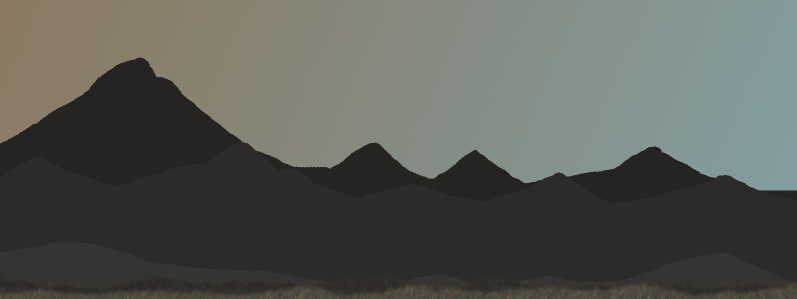
So today I began to make a background like how Jake made the background for the city landscape. I first started out with the mountains, Jake told me how to make them. He had used a pencil tool to create the mountains for his scene. Then I was told to make it 8000 pixels long so I decided to just make a trial landscape with Jake's work. I also added a gradient in the back to make it transition from Jake's landscape to mine. I learned how to use the gradient and how Jake makes his artwork and its pretty easy fro what it looks like. Tomorrow I plan to work on the 8000 pixel landscape.
Day 55 Dec
So today I forgot to take about how we need to figure out our next steps. I pretty much continued to work on my landscape by picking out the color Jake is using for his and shading it in the right direction because in Jakes it looks like the sun is in the left. I still need to make the trees i might just have jake do it and give it to me it would be easier. I learnt today that photoshop art is getting more in depth because I'm actually thinking about where the lighting is gonna be from and how the shading is going to alter the landscape. Tomorrow I plan on finishing the background of the landscape and try to restart the trees.
Subscribe to:
Comments (Atom)